Recent Posts

Pages: [1] 2 3 ... 10
1

Redstallion/Getty Images

When your phone turns off, it shuts down all background processes. Upon turning back on, it initializes everything from scratch, including the operating system, the hardware configurations, and apps that may run in the background on your phone. This happens regardless of whether you choose a restart or power your phone off, and both methods can result in a faster, smoother experience afterward.

The only difference between rebooting your phone and shutting it down is the amount of time it stays powered off. A restart means that it turns on immediately after it stops all processes and starts initialization, whereas when you power it off, you choose when to boot it back up. There is no evidence that powering your phone off offers any real system benefits over simply restarting or rebooting your phone — it doesn't "deep clean" your phone's memory, nor does it deal with processes any better than restarting it would. Since a reboot takes significantly less time than turning the power off and turning it back on, restarting your phone is almost always the better option.

 Just like how often you should clean your phone depends on your specific needs, how often you need to reboot a smartphone differs from person to person. Most experts recommend that you at least do it every once in a while if you want to continue using your phone for a long time or are dealing with a laggy phone.

When should you power off your phone?


Weerayut Chaiwanna/Getty Images

When it comes to the technology and how the system behaves, there's no advantage to powering your phone off compared to restarting or rebooting it. However, there are cases where controlling how much time your phone stays powered off can be better than a quick and immediate reboot.

For example, if you need to conserve your phone battery, keeping it powered off can be a good idea. Do note that the battery saved is minimal, since the difference in battery percentages will generally be single digits if you shut your phone down versus letting it stay on in sleep mode. Additionally, your phone eats up a small burst of battery when booting up, so unless you'll have your phone off for 8-plus hours — such as when you're asleep — we don't recommend powering your phone off just for the battery advantages.

Another scenario where fully turning off your phone's power can help is if it's overheating badly. If your phone is throttling performance due to graphic-intensive work or using the device outside in the sun, then closing all system operations is the best way to cool it down. If you restart your phone in this case, even if the background process shut down once, they'll simply restart — compared to shutting it off, where all stress on the phone will cease until you turn it back on. You may also need to turn the power off when you're fixing your phone at home, such as when you're replacing a battery or before entering the Android recovery menu.

source
2
Social Media / Meta says New Mexico lawsuit could force Facebook, out of state
« Last post by javajolt on May 05, 2026, 01:16:11 PM »
Trial could force Meta to add age verification, kill infinite scroll, and limit encryption for minors

Why it matters: A judge in Santa Fe will spend the next three weeks deciding whether Meta's platforms have created a public nuisance in New Mexico – a determination that could force major changes to how Facebook, Instagram and WhatsApp work, or potentially push the company out of the state entirely. The bench trial starting Monday is the second phase of a lawsuit filed by New Mexico Attorney General Raúl Torrez, who's accused Meta of building products designed to hook young users while doing little to stop child sexual exploitation.

Back in March, a jury already found the company violated the state's consumer protection law by lying about platform safety and hit Meta with $375 million in damages.

Public nuisance law usually goes after things like factories dumping chemicals in rivers or businesses blocking roads – activities that mess with public health and safety. But states have started using it more broadly over the past few decades, going after tobacco companies, opioid makers and now social media platforms.

Judge Bryan Biedscheid has to decide whether Meta's conduct fits that standard under New Mexico law. More than 40 other states and over 1,300 school districts are watching this case closely because they've filed similar lawsuits trying to force platform changes.

Massachusetts' top court ruled in April that Meta has to face a public nuisance case there too, rejecting the company's Section 230 immunity defense.

The state is pushing for age verification systems that would stop adults from pretending to be minors, algorithm overhauls that don't just chase engagement metrics for kids, and killing features like autoplay and infinite scroll for underage users. They also want warning labels, permanent bans for adults who help enable exploitation, and limits on end-to-end encryption for minors.

An independent monitor appointed by the court would enforce all this, though Torrez said at a press conference last week they haven't picked anyone yet. "It will be an opportunity for us to explore more deeply the size and scale and effectively the monetary value of the public nuisance harm that was a product of this business's behavior for the last, you know, 10 or 15 years," he told reporters.

Beyond platform changes, New Mexico can ask for damages to fix the harm. Meta says in court filings the state wants $3.7 billion for a 15-year mental health program that would include building new facilities and hiring providers – basically forcing Meta to pay for mental health care for every teen in New Mexico regardless of why they need it. The attorney general's office hasn't said publicly what dollar figure they're actually seeking.

Meta fired back that most of what New Mexico wants is "technologically or practically infeasible" and would require building completely separate apps just for New Mexico users. The company warned it might have to pull Facebook, Instagram and WhatsApp from the state's 2.1 million residents rather than try to comply.

Torrez called that a "PR stunt." "We know Meta has the ability to make these changes. For years, the company has rewritten its own rules, redesigned its products and even bent to the demands of dictators to preserve market access," he said. "This is not about technological capability. Meta simply refuses to place the safety of children ahead of engagement, advertising revenue and profit."

The company says it's already fixed many of the problems New Mexico complained about and has taken serious steps to protect young users. In court filings, Meta argues it couldn't have created a public nuisance because it hasn't interfered with any public right.

Meta also says there's no scientific proof social media causes mental health problems, and that the state's demands would trample on parental rights and free speech for everyone in New Mexico.

source
3
Microsoft built Windows 11 around web wrappers and Electron apps. Now it's trying to undo that.

Microsoft is trying to repair Windows 11's reputation and overhaul its app ecosystem, and both efforts center on one idea: get back to fundamentals and make the OS feel like a fast, coherent, native-first platform again. That shift runs from Satya Nadella's pledge to "win back fans" to internal engineers publicly declaring that "Native apps are back!" for Windows 11.

During Microsoft's fiscal Q3 2026 earnings call, Nadella put consumer Windows front and center. As part of Microsoft's broader push to reconnect with users across its platforms, he framed the Windows strategy as a back-to-basics project around performance, quality and core UX. "When it comes to our consumer business, we are doing the foundational work required to win back fans and strengthen engagement across Windows, Xbox, Bing, and Edge. In the near term, we are focused on fundamentals, prioritizing quality and serving our core users better," the CEO said.

He cited work already underway in Windows 11, including performance improvements for lower-memory devices, a streamlined Windows Update experience, and a renewed emphasis on "core features and fundamentals that matter most to our customers."

Those remarks came as Microsoft reported that monthly active Windows devices have surpassed 1.6 billion, a figure that includes Windows 10 and older versions. Nadella argued that, over time, "Windows value will extend to deliver unmetered intelligence at the edge," positioning the OS as the local substrate for AI workloads instead of just a thin client for cloud services.

For longtime Windows users, though, the more immediate concern has been day-to-day friction: ads and upsells in the out-of-the-box experience, UI inconsistencies, and system components that feel sluggish compared with older releases.

Inside the Windows organization, the response is showing up as a mix of OS-level and app-level changes that all point in the same direction: less web wrapper, more native code.

Microsoft has already teased at least 18 notable improvements for Windows 11 in 2026, several of which are rolling out to early adopters. The company is testing a "quieter" Windows with fewer upsells and ads in the setup flow, along with a more streamlined first-time setup that takes fewer clicks to reach the desktop, including the ability to skip updates during OOBE.

Other work focuses on fundamentals: reducing baseline RAM usage, fixing dark mode inconsistencies across legacy dialogs and tools like Registry Editor, and moving more Control Panel functionality into the modern Settings app without breaking older hardware and workflows.

Performance problems haven't been limited to the OS shell. The Microsoft Store's evolution into a framework-agnostic distribution channel made it easier to ship Progressive Web Apps and Electron-style wrappers, but it also pushed many popular services away from native WinUI implementations. Netflix and WhatsApp are among the apps that moved from native frameworks to WebView2-based PWAs on Windows 11, with testing showing WhatsApp using around 600MB of RAM on an 8GB machine while idle.

Electron-based Discord can use up to 4GB of RAM and includes a mechanism to restart itself when usage gets too high. Users have been complaining for some time on forums like Reddit that this shift to web-centric clients has hurt overall OS responsiveness, especially on mid-range hardware.

Microsoft's own apps face similar issues. The web-based Copilot experience on Windows 11 pulls in a full Edge stack and, in testing, has been observed using roughly 500MB of RAM in the background and up to 1GB under active use.

The company's answer is not to retreat from rich clients but to rebuild them with native tooling. Rudy Huyn, a Partner Architect working on the Store and File Explorer, has said he is forming a team focused on building better Windows 11 apps and has confirmed that new experiences from that group will be "100% native."

That push gained a public signal boost when David Fowler, a distinguished engineer at Microsoft known for his work on .NET and ASP.NET Core, posted a simple message on X: "Native apps are BACK!"

Inside the Windows community, the comment has been read as an indication that Microsoft intends to move key experiences away from web wrappers and back to native frameworks such as WinUI.

One visible example is the Windows 11 Start menu, which is shifting from React-based components to WinUI to cut latency and improve reliability, alongside plans to make it resizable again, as it was in Windows 10.

Under the hood, .NET 10 and its Native AOT (ahead-of-time compilation) support are expected to be central to this strategy. Native AOT is designed to reduce startup times and memory footprints for .NET applications compared with traditional JIT-heavy .NET deployments, which could directly address the overhead seen in today's WebView2 and Electron apps.

If Microsoft can demonstrate those benefits in its own in-box apps – File Explorer, communications clients, utilities – it will be in a stronger position to convince third-party developers to follow.

The more difficult problem is ecosystem inertia. Developers have grown used to cross-platform web stacks that let them target Windows, macOS, and mobile with a single codebase, even if that comes with higher resource usage on Windows.

To shift that calculus, Microsoft will likely need more than architectural guidance; it will have to show that 100% native Windows 11 apps can deliver clear performance and UX gains without giving up reach, and possibly sweeten the deal with Store visibility or other incentives.

For now, Nadella's focus on "foundational work" and Fowler's assertion that native apps are back describe the same direction: a Windows 11 that feels less like a cluster of web views and more like a coherent, responsive operating system.

source
4
iPhone | iApps / How Apple's Folding iPhone Could Stand Apart
« Last post by javajolt on May 01, 2026, 09:11:52 PM »
The so-called "iPhone Ultra" might dodge the problems of other book-style foldable phones with a hybrid iPhone-iPad interface.


Foldable phones are a hard breed for me to love. They cost about twice as much as a high-end smartphone, and having two screens and moving parts means more ways for them to break. Plus, these book-style models are bulkier to hold and often don't have the best cameras.

But the genre is evolving fast. And after reading David Lumb's first impressions of Motorola's new book-style foldable, the Razr Fold, I'm starting to give the style another chance. Its shorter, "passport-style" design is going head-to-head with Samsung's rumored wider Galaxy Fold 8, and it may not be long before Apple steals the spotlight with a folding iPhone.

So for this week's episode of One More Thing, embedded above, I can't help but poke at the potential of Apple's rumored foldable, which reportedly could be called the iPhone Ultra. Judging by some reports, Apple might have the experience running smoothly right at launch with an iPad-like interface when the device is opened.

But good software alone doesn't make the price easier to swallow. It's expected to cost over $2,000. It might be an easier sell if you think of it as buying an iPhone with an iPad inside. I'm not ready to close the book on the idea just yet.

source
5


Microsoft is now rolling out its Xbox mode to all Windows 11 PCs. The new Xbox mode adds a full-screen interface to the Xbox PC app, much like Steam’s Big Picture Mode, and originally debuted as the Xbox Full Screen Experience (FSE) with Asus’ Xbox Ally devices.

“Some players in select markets will be able to download the Xbox mode experience today, with availability expanding to more players in those markets over the next several weeks,” says the Xbox team. You’ll be able to get the Xbox mode by installing the latest Windows update for Windows 11.

Xbox mode aims to try and bridge the gap between Xbox consoles and Windows, but its original debut felt like a beta on the Xbox Ally devices. “Since first introducing Xbox mode, formerly known as ‘full screen experience,’ on Windows handhelds, we’ve been listening closely to player feedback and continuing to evolve the experience across devices,” says the Xbox team. “Those learnings directly shaped Xbox mode on Windows 11 PCs.”

Microsoft is also rolling out improvements to the Xbox Ally X handheld today, including a preview of its Auto SR upscaling technology. Xbox console owners are also getting a new dashboard update today, with the ability to disable Quick Resume on individual games and a feature to add custom colors to the dashboard.

source
6
Apple’s iPhone 18 Pro Max represents a significant leap forward in smartphone technology, introducing new advancements in display quality, camera performance and processing power. Alongside the Pro Max, the iPhone 18 lineup includes the highly anticipated iPhone Fold, which aims to establish a new standard in foldable devices. While the base iPhone 18 offers subtle refinements, the Pro and Pro Max models are designed to deliver innovative features that cater to both tech enthusiasts and everyday users, solidifying Apple’s position as a leader in the industry.

Key Features of the iPhone 18 Pro and Pro Max

The iPhone 18 Pro and Pro Max are packed with features that push the boundaries of what smartphones can achieve. These devices are tailored to meet the demands of users who prioritize performance, design and functionality.

Innovative Display Technology: Both models feature LTPO Super Retina XDR OLED displays, using Samsung’s M16 OLED panel to deliver exceptional brightness, color accuracy and energy efficiency. The Pro Max features a 6.9-inch display with industry-leading brightness levels, while the Pro offers a slightly smaller 6.3-inch screen. With thinner bezels and a reduced Dynamic Island, the design is sleeker and more immersive than ever.

State-of-the-Art Camera Systems: The Pro Max introduces a 200 MP periscope camera, offering unmatched zoom capabilities and a larger 1/1.12-inch primary sensor for superior low-light performance. The Pro model features a versatile triple-camera setup, including a 48 MP main sensor, a 48 MP ultrawide lens and a 64 MP periscope lens. Both models incorporate variable aperture technology, allowing greater control over depth of field and light capture for professional-grade photography.

Unrivaled Performance: Powered by the A20 Pro chip built on an advanced 2nm process, these devices deliver industry-leading speed and efficiency. With 12 GB of RAM and storage options up to 2 TB for the Pro Max, users can enjoy seamless multitasking and ample space for media. Additionally, Apple’s custom C2 modem enhances connectivity and overall performance.

Extended Battery Life: The Pro Max is equipped with a 5,200 mAh battery, while the Pro features a 4,300 mAh unit. Combined with the efficiency of the A20 Pro chip, both models provide extended battery life, making sure reliable performance throughout the day, even under heavy usage.

Advanced Connectivity: Both models support 5G, Wi-Fi 7, Bluetooth 6 and ultrawide band technology. Expanded satellite communication capabilities allow users to make calls in remote areas without cellular coverage, enhancing reliability in challenging environments.

The iPhone Fold: Apple’s Vision for Foldable Devices

Apple’s iPhone Fold marks a bold entry into the foldable smartphone market, combining innovation with practicality. Featuring a 5.5-inch external display and a 7.8-inch internal folding OLED screen, the device minimizes visible creases, addressing a common challenge in foldable technology. This design ensures a seamless viewing experience, whether the device is folded or unfolded.

The iPhone Fold is powered by the A20 Pro chip, paired with 12 GB of RAM and up to 2 TB of storage, delivering top-tier performance for multitasking and media consumption. Its dual-camera system includes a 200 MP primary sensor and a 48 MP ultrawide lens, providing exceptional photography capabilities. Additionally, the integration of Touch ID into the power button enhances security and convenience. With an estimated price of $2,000, the iPhone Fold is positioned as a premium option for users seeking innovative innovation.

The Base iPhone 18: Balancing Features and Affordability

The base iPhone 18 offers a more accessible option within the lineup, featuring subtle yet meaningful updates. While it may see a slight reduction in display brightness due to rising component costs, it retains ProMotion technology, making sure smooth scrolling and responsiveness. This distinction between the base and Pro models allows Apple to cater to a broader range of user preferences and budgets, making advanced technology more widely available.

Color Options, Pricing, and Availability

The iPhone 18 lineup is expected to feature a variety of color options, including dark cherry, light blue, dark gray and silver. However, some reports suggest that a black model may not be available this year. Pricing starts at $1,099 for the iPhone 18 Pro and $1,199 for the Pro Max, while the iPhone Fold is estimated to cost $2,000. The lineup is anticipated to launch in September 2026, aligning with Apple’s traditional release schedule.

AI Integration and iOS 27: Enhancing the User Experience

The iPhone 18 series will debut with iOS 27, which introduces advanced AI-driven features designed to streamline daily tasks and enhance overall device performance. Smarter Siri interactions, improved photo editing tools, and predictive text capabilities are just a few examples of how AI integration aims to make the user experience more intuitive and efficient. These enhancements reflect Apple’s commitment to using artificial intelligence to improve functionality and usability across its devices.

A Lineup Tailored to Diverse Needs

The iPhone 18 Pro Max and its counterparts highlight Apple’s dedication to innovation and refinement. With advancements in display technology, camera systems and battery efficiency, the Pro and Pro Max models cater to users seeking premium performance and innovative features. Meanwhile, the iPhone Fold offers a glimpse into the future of foldable smartphones, appealing to those who value new design and functionality. For budget-conscious buyers, the base iPhone 18 provides a reliable and feature-rich option.

Whether you are upgrading from an older device or exploring the latest in smartphone technology, the iPhone 18 lineup offers a range of choices designed to meet the needs of a diverse audience.

source
7


The ONEXPLAYER Super V has captured attention as the first gaming tablet to feature Intel’s Panther Lake CPU and Arc B390i GPU, marking a significant milestone in portable computing. In a recent breakdown by ETA Prime, the device’s standout features, such as its 14-inch 2.8K AMOLED display with a 120 Hz variable refresh rate and 100% DCI-P3 color gamut, were explored in detail. This combination of high-resolution visuals and precise color accuracy positions the Super V as a versatile option for both gaming and professional tasks. Additionally, the inclusion of a detachable keyboard and pen compatibility highlights its dual-purpose design, catering to users who require both performance and flexibility.

Dive into this overview to understand how the Super V handles demanding workloads with its Intel Core Ultra X7 358H processor and 48 GB of LPDDR5X RAM, as well as its performance benchmarks in AAA gaming titles like Cyberpunk 2077. You’ll also gain insight into its advanced thermal management system, battery optimization features and customizable software, which together enhance its usability across various scenarios. Whether you’re curious about its gaming capabilities or its potential as a productivity device, this guide offers a comprehensive look at what the Super V brings to the table.

Immersive Display: Precision and Versatility

The Super V is equipped with a 14-inch AMOLED display that features a 2880×1800 resolution (2.8K), providing sharp, vibrant visuals. Its 100% DCI-P3 color gamut ensures accurate color reproduction, making it an excellent choice for gaming, content creation and media consumption. The display supports a variable refresh rate (VRR) ranging from 30 Hz to 120 Hz, allowing users to balance smooth performance with energy efficiency. HDR support enhances contrast and brightness, delivering a more immersive viewing experience. Additionally, the screen is pen-compatible, catering to creative professionals who require precision for tasks such as drawing, sketching, or note-taking.

Specifications


Performance Hardware: Power and Efficiency Combined

At the heart of the Super V lies the Intel Core Ultra X7 358H processor, featuring 16 cores and 16 threads with a maximum clock speed of 4.8 GHz. This is paired with the Intel Arc B390i GPU, which includes 12 XE3 cores running at up to 2500 MHz, making sure exceptional performance for gaming and multitasking. The device is further enhanced by 48 GB of LPDDR5X RAM, clocked at an impressive 8533 MHz, allowing it to handle demanding workloads with ease. Storage is equally robust, with a 1 TB M.2 SSD for fast data access, expandable via microSD and mini SSD slots, making sure ample space for games, applications and files.

Thermal Management and Build Quality

The Super V’s dual-fan cooling system with copper heat sinks ensures efficient thermal management, maintaining optimal performance even during extended gaming sessions. The CNC aluminum mid-frame enhances durability while keeping the device slim, with a profile of just 13 mm. A built-in kickstand with 173° adjustability adds flexibility, allowing users to easily switch between gaming, working, or streaming. This thoughtful design ensures that the Super V is not only powerful but also practical for everyday use.


Battery Life and Power Optimization

The Super V is powered by an 85.85 Wh battery, offering impressive longevity across various use cases. Users can expect up to 12 hours of video playback, 6.75 hours for indie gaming and 2.7 hours for AAA titles. Adjustable TDP settings, ranging from 3 W to 65 W, provide the flexibility to optimize power consumption based on specific needs. The device also features bypass charging, which protects the battery by directly powering the device when plugged in. A 140-W USB Type-C charger ensures rapid recharging, minimizing downtime and keeping users productive.

Customizable Software and Enhanced Gaming

Pre-installed with 1X console software, the Super V offers extensive customization options, allowing users to adjust performance settings, RGB lighting and fan speeds to suit their preferences. Intel XeSS frame generation technology further enhances gaming performance by boosting frame rates without compromising visual quality. Whether you’re gaming, streaming, or working, the Super V adapts to your specific requirements, delivering a tailored experience that meets the demands of modern users.

Gaming Performance: Meeting High Expectations

The Super V excels in gaming, providing smooth and responsive gameplay even for demanding titles such as Cyberpunk 2077, Red Dead Redemption 2, and Spider-Man 2. Intel XeSS technology uses AI to generate additional frames, making sure a fluid and immersive experience. Benchmark results highlight its capabilities, with scores such as 2743 (single-core) and 16,596 (multi-core) in Geekbench 6 and 7673 in 3DMark Time Spy, underscoring its ability to handle high-performance gaming with ease.

Audio and Connectivity: Comprehensive Features

The Super V is equipped with Harman-certified dual stereo speakers, delivering immersive audio that enhances both gaming and media experiences. The detachable RGB backlit keyboard includes a trackpad, transforming the tablet into a fully functional laptop for productivity tasks. Connectivity options are robust, featuring Thunderbolt 4 ports, USB 3.2 Gen 2 and a full-size HDMI port, making sure compatibility with a wide range of peripherals. Additionally, RGB lighting customization adds a personal touch, allowing users to tailor the device to their preferences.

Setting a New Standard for Portable Devices

The ONEXPLAYER Super V combines innovative hardware, a stunning AMOLED display and versatile features in a portable form factor. Whether you’re a gamer seeking top-tier performance or a professional in need of a reliable productivity tool, the Super V delivers a premium experience tailored to your needs. Its innovative design, advanced technology and thoughtful features establish it as a benchmark for portable gaming and productivity devices, offering a glimpse into the future of hybrid computing.

source
8
Microsoft on Monday revised its advisory for a now-patched, high-severity security flaw impacting Windows Shell to acknowledge that it has been actively exploited in the wild.

The vulnerability in question is CVE-2026-32202 (CVSS score: 4.3), a spoofing vulnerability that could allow an attacker to access sensitive information. It was addressed as part of its Patch Tuesday update for this month.

"Protection mechanism failure in Windows Shell allows an unauthorized attacker to perform spoofing over a network," Microsoft noted in an alert. "An attacker would have to send the victim a malicious file that the victim would have to execute."

"An attacker who successfully exploited the vulnerability could view some sensitive information (Confidentiality) but not all resources within the impacted component may be divulged to the attacker. The attacker cannot make changes to disclosed information (Integrity) or limit access to the resource (Availability)."

On April 27, 2026, Microsoft said it rectified the "Exploitability Index, Exploited flag, and CVSS vector" as they were incorrect when they were published on April 14.

While the tech giant did not share any details about the exploitation activity, Akamai security researcher Maor Dahan, who is credited with discovering and reporting the bug, said the zero-click vulnerability stems from an incomplete patch for CVE-2026-21510.

The latter has been weaponized by a Russian nation-state group tracked as APT28 (aka Fancy Bear, Forest Blizzard, GruesomeLarch, and Pawn Storm) along with CVE-2026-21513 as part of an exploit chain -

CVE-2026-21510 (CVSS score: 8.8) - A protection mechanism failure in Windows Shell that allows an unauthorized attacker to bypass a security feature over a network. (Fixed by Microsoft in February 2026)

CVE-2026-21513 (CVSS score: 8.8) - A protection mechanism failure in MSHTML Framework that allows an unauthorized attacker to bypass a security feature over a network. (Fixed by Microsoft in February 2026)

It's worth noting that the abuse of CVE-2026-21513 was also flagged by the web infrastructure and security company early last month, linking it to APT28 after unearthing a malicious artifact in January 2026.


---- CVE-2026-21510 Exploitation
The campaign, targeting Ukraine and E.U. nations in December 2025, leverages a malicious Windows Shortcut (LNK) file to exploit the two vulnerabilities, effectively bypassing Microsoft Defender SmartScreen and enabling attacker-controlled code to be executed.

"APT28 leverages the Windows Shell namespace parsing mechanism to load a dynamic-link library (DLL) from a remote server using a UNC path," Dahan explained. "The DLL is loaded as part of the Control Panel (CPL) objects without proper network zone validation.

Akamai said the February 2026 patch, while mitigating the remote code execution risk by triggering a SmartScreen check of the CPL file's digital signature and origin zone, still allowed the victim machine to authenticate to the attacker's server and automatically fetch the CPL file by resolving the Universal Naming Convention (UNC) path and initiating an SMB connection without requiring user interaction.

"When that path is a UNC path (like '\\attacker.com\share\payload.cpl'), Windows initiates an SMB connection to the attacker's server," Dahan said. "This server message block (SMB) connection triggers an automatic NTLM authentication handshake, sending the victim's Net-NTLMv2 hash to the attacker, which can later be used for NTLM relay attacks and offline cracking."

"While Microsoft fixed the initial RCE (CVE-2026-21510), an authentication coercion flaw (CVE-2026-32202) remained. This gap between path resolution and trust verification left a zero-click credential theft vector via auto-parsed LNK files."

source
9
Smiley Wink Cheesy Grin Angry Sad Shocked Cool Huh Roll Eyes Tongue Embarrassed Lips sealed Undecided Kiss Cry
Microsoft has restructured its Windows team to better position Windows 11 as a strong platform that people should want to use. Here's how it's going about that.

In March, Windows president Pavan Davuluri confirmed plans to address serious "pain points" across Windows 11 that have eroded user trust and generated a wave of negative sentiment around the OS, spawned from Microsoft's relentless push into AI and enshittification while neglecting core Windows fundamentals such as performance and reliability.

Of course, what Microsoft says externally isn't always reflective of what it's really thinking internally, but in this case, my sources say the company is serious about turning Windows 11 into a platform that people are proud to use. By the end of 2026 and into 2027, Microsoft is striving to have Windows 11 in a much better place.

According to my sources, this effort is codenamed Windows K2. It’s a project that was put together in the second half of last year that addresses the biggest complaints that people have about Windows 11 today. Everything from an overabundance of AI features and bloat to performance issues and reliability mishaps will be tackled.

Windows K2 isn’t a dedicated release of the OS. Instead, K2 is an ongoing initiative that will ensure Windows quality remains both high and consistent across current and future versions, building an OS that is always focused on improvements to fundamentals to ensure foundational aspects of the platform are continuously strong.

Performance, Craft, and Reliability

These are the three core pillars of focus with the Windows K2 initiative.

These pillars are what drive the Windows experience. If one of these pillars falls behind, the entire product suffers as a result. With Windows K2, Microsoft is working to ensure these three pillars are strong by addressing feedback directly from users and Insiders, analyzing telemetry data, and conducting focus groups with customers.

I'm told that K2 also looks inward at the teams themselves. It's not just about addressing feedback and fixing Windows 11, but it's also about how teams internally can better contribute code to the Windows product. I understand there's a huge culture shift happening internally right now that drives the K2 initiative.

In the past, Windows has been obsessed with agility. It was keen to ship new features as quickly and as frequently as possible, but this ultimately came at the cost of quality and reliability. While teams were able to get new features out the door fast, users became frustrated with an OS that never stood still and becoming ever more problematic.

One of the biggest cultural changes internally that I've heard about is that teams are no longer striving to ship fast. The obsession with with being agile has been replaced with an obsession with quality. I understand that new features aren't allowed near public preview builds before reaching a certain quality bar internally now, and while that bar has always existed, the bar is much higher now.

There's a lesser known fourth pillar, too: Community. The Windows K2 initiative is eager to rebuild a community of fans and enthusiasts around Windows. It's bringing back Windows Insider meetups, and appointing members of the Windows team to be more forward facing on social media and in forums to respond directly to feedback from people online.

Performance and Reliability


(Image credit: Daniel Rubino | Windows Central)
Performance is a top priority for the Windows K2 effort. In documentation viewed by Windows Central, Microsoft is aware that it has let performance slip in apps like File Explorer and games, as well as system UI elements such as context menus. Windows 10 is often found to be faster than Windows 11 in certain benchmarks, and the company is moving to change this.

For gaming, Microsoft views steamOS as the benchmark, and is working to optimize the platform so that steamOS and Windows gaming performance are comparable. Within the next year or two, it believes that Windows will be able to truly compete head-to-head with steamOS in gaming performance on identical hardware due to foundational changes that are being made to the platform in the coming months.

File Explorer is set to gain some major performance improvements too, speeding up file navigation and processing, and improving the speed of search within the File Explorer app, with capabilities such as “instant filename search” coming. The company views a third-party app called File Pilot as the benchmark for these improvements.

Windows Update will also be improved, with the goal of making Windows 11 reliable enough so that a restart is only necessary once a month. Under the hood changes are also expected that are designed to make updating Windows more seamless, such as only updating display and audio drivers when restarting instead of during active use.

I’m told there’s also a concerted effort to debloat Windows 11 too, focusing on minimizing memory use at idle and reducing the overall footprint of the OS so that it runs better on low-end hardware as well as smoother on high-end systems and gaming handhelds.

Craft and UI


(Image credit: Windows Central / Zac Bowden)
Craft is also a huge area of focus for K2, addressing user experience complaints and bringing back fan favorite features that have been missing since Windows 11's inception. Microsoft has already confirmed plans to bring back the ability to move and resize the Taskbar, one of Windows 11's most requested features.

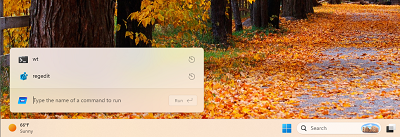
The K2 initiative is also pushing teams internally lean more heavily on its in-house Windows UI framework. WinUI 3 is a core foundational aspect of K2, with performance improvements in the works to ensure these native UI surfaces are faster and more reliable so that it can be used in more areas of the system, including where legacy interfaces currently exist such as Run and Control Panel.

One of the ways I'm told this is happening is with a new System Compositor for WinUI 3, which will reduce latency and memory overhead across the UI so that elements such as the Start menu and Taskbar are always responsive and available to use, even under heavy system load.

In fact, with this new compositor in place, Microsoft is rebuilding the Start menu from scratch with WinUI 3 natively. I'm told this new Start menu will be up to 60% faster and more responsive than the existing one, while also sporting more customization options such as the ability to resize it and hide sections of the menu.

The K2 project also address some of the big issues around enshittification. I'm told Microsoft is removing ads from the Start menu, which is no small feat from a financial perspective. It's also planning to stop MSN from appearing by default in the Widgets Board, instead prioritizing the Widgets Panel with MSN being a secondary functionality instead of the primary one.

K2 evolves

Windows K2 doesn't have a completion date. It's an ongoing initiative that essentially defines how Windows should be built and what it should prioritize going forward. The goal is to fix up Windows 11 and reposition the platform as something people are proud to use, and maintain that consistently.

It's a positive movement that Windows desperately needs, and is helping to position the platform as a viable competitor well into the future. Changes and improvements that are part of the Windows K2 initiative are already beginning to ship, with many more shipping in preview over the summer.

source
10
Apple / 14 Products Apple is saying GoodBye to in 2026
« Last post by javajolt on April 27, 2026, 09:10:31 PM »


If you're an Apple user, it's been a great past few years for hardware. We've gotten upgraded AirPods Pro 3, a redesigned iPhone 17 Pro, and a budget-friendly MacBook Neo. The MacBook and iPad lineups continue to perform well with their M-series chips. And the best part? Apple has a habit of supporting its devices for quite a long time, ensuring you can comfortably use them for years to come. Eventually, though, support runs out. In 2026, we say goodbye to another handful of devices.

By "saying goodbye," we mean one of two things: Either the tech giant has ceased manufacturing and selling them or has cut off repair and software support. You'll still be able to buy these 14 products at third-party retailers (and still get updates, in most cases) and get repairs for them at independent shops, but in the eyes of Apple, they're ancient history.

First-Generation AirTags


Apple unveiled AirTags in 2021, and they've quickly amassed a billion-dollar industry of their own. The premise is simple: Place the $29 circle in your purse, backpack, or luggage to track it down subscription-free. There are some things you shouldn't track with them, but on the whole, they're some of the best tracking devices on the market. In 2026, Apple introduced the second-gen AirTag. Wider range, easier tracking, recycled materials, same price. As for the old first-gen AirTags, they've been quietly delisted.

On Apple's website, there is no "AirTag 2" — it's just an invisibly upgraded AirTag. You can no longer purchase the original directly from Apple. However, the good news is that the "old" AirTags have dropped accordingly in price. While the second generation is certainly an upgrade, the originals still work incredibly well. The replaceable batteries ensure they can be used for years. Just make sure you know which one you're getting; both versions are hard to tell apart.

iPhone 16e


The iPhone 16e appeared out of a puff of smoke in 2025, years after it looked like Apple had given up on its budget SE and iPhone Mini. It seems like it was a success, garnering stronger sales as a spiritual successor than the SE. Having said that, it did leave something to be desired with that $600 "budget" price tag, like missing MagSafe. The iPhone 17e, announced in March 2026, replaced it, and by all accounts has shored up its predecessor's weaknesses and made the "e" lineup an easy recommendation for someone looking for the cheapest iPhone possible.

As such, the iPhone 16e is now MIA. You'll find the iPhone 16 on Apple's website, but not the 16e. In typical Apple fashion, it doesn't like giving you the cheaper, older model as an option. That said, it's still a more than usable phone that's on the list of supported devices for iOS 26. iPhones typically get the latest software feature updates for up to seven years. If that holds true for the iPhone 16e, then it should be supported until at least 2030, possibly as late as 2032.

M4 MacBook Air


Every one or two years, Apple releases an upgraded MacBook Air; 2025 was no different, with the M4 MacBook Air unveiled in March. As has been the case for the past couple of years, this was just a spec bump — slightly more powerful chip, better webcam, but it's effectively the same laptop as the M3 and M2 that came before. Perhaps the most notable change was making 16GB of RAM the baseline configuration rather than 8GB. On the heels of the M5 MacBook Air release in March 2026, however, it (like the iPhone 16e and other previous-year products) dropped off Apple's website into oblivion. The only place you will find it is in the Certified Refurbished section, if stock is available.

It's roughly the same situation as with the iPhone 16e. The M4 MacBook Air will likely continue to receive macOS updates until at least 2030, possibly 2033 at the latest. And again, it's not far behind Apple's bleeding-edge hardware offerings. Unless you're a professional who needs the absolute max horsepower for your workloads, then the M4 is going to serve you very well for a long time. You might be able to find the M4 MacBook Air for a lot less — though bear in mind that because of high RAM prices, that could be challenging.

MacBook Pro (M4 Pro and Max)


Generally speaking, Apple puts out its MacBook Pro models shortly after the yearly iPhone release in the fall, and then waits until spring of the following year to put the same chip in the latest MacBook Air. One major hardware difference (aside from a better screen, better speakers, etc.) that sets the MacBook Pros apart from the MacBook Air is the more powerful Pro and Max variants. The MacBook Pro M4 Pro and MacBook Pro M4 Max models, released in October 2024, are already a distant memory; you cannot buy the M4 Pro and M4 Max variants brand-new on Apple's site, only in the Certified Refurbished section.

Doing the math, the MacBook Pro M4 Pro and Max could possibly lose macOS support before the M4 Air in late 2029, or 2032 if lucky. That said, this is an absolute beast of a machine for virtually any heavy-duty workload — video editing, app development, 3D rendering — so buying one today is not a bad idea. Grab one over a newer, more expensive M5 model equivalent if you can find a good deal.

Upgrading such an expensive device when updates end in 2032 would be painful if you don't need to. Luckily, there are options when official support ends. You may be able to update to the latest version of macOS — even if your Mac isn't officially supported — with OpenCore Legacy Patcher. Asahi Linux may also be available for the M4 family by that time.

M3 iPad Air


Don't want to spend a financially irresponsible amount of money on the overpowered iPad Pro M5? The iPad Air is the next best thing. Since 2024, Apple has bequeathed M-Series chips to the mid-range iPad Air lineup, and the latest version released in 2026 gets the M4 chip. It's two years late, but considering the power of the M4 chip and the $599 starting price tag of the Air? That's still overkill for most. So unfortunately, the cheaper last-gen M3 iPad Air released in March 2025 is no longer an option from Apple's website, except where refurbished.

Naturally, people probably upgrade their tablets less than they might even update their computers, since running the Netflix app in bed does not require top-tier silicon. The third-gen iPad Pro released in 2018 is still on the iOS 26 update track, meaning it's been receiving official support for at least eight years. Following that logic, the M3 iPad Air could possibly continue to get feature updates into 2033 and maybe even beyond. Buying this one used once the price goes down even a year or two from now wouldn't be a bad idea.

Apple Studio Display (2022 model)


Released in 2022, the Studio Display is a 27-inch monitor at a 5K resolution and a 60Hz refresh rate. The $1,600 asking price makes it decidedly pro-only. If that's only the amount of money you'd spend on a very expensive computer, though, there are plenty of alternatives that won't break the bank. In 2026, Apple refreshed the Studio Display's internal hardware — not the panel — so the 2022 models are gone from Apple's site, Certified Refurbished options notwithstanding.

The Apple Studio display gets semi-regular firmware updates to fix issues rather than provide new features, with the latest releasing in 2023 and requiring macOS Sonoma 14. A monitor is naturally a device people don't update very often and keep as long as they can. It's likely the now-outdated 2022 Studio Display will work well for a long, long time even if no further firmware updates are released, so there probably won't be an issue buying a used one in the future.

Pro Display XDR


If you thought the Studio Displays were expensive, then the Pro Display XDR took it to another level with its $6,000 price tag in 2019 — and that didn't include the extra-special $1,000 stand. It was a 32-inch 6K monitor at 60 Hz. Was/is it worth it? For most people, probably not, but to each their own. Its seven-year run as Apple's most premium display is over now that the Studio Display XDR has released. In most ways, the Studio Display XDR is a proper upgrade and not a slight spec bump like with the normal Studio Displays. Camera and speakers, more dimming zones, stronger backlight, variable refresh rate, the works.

Similar to the Studio Display, the Pro Display XDR gets firmware updates. The last one was in December 2020 and supports macOS 10.15.6 and above. If you can find an old Pro Display XDR for a price you consider to be reasonable, then it should continue to work for you for many years to come — same as with the Studio Display.

Mac Pro


In 2019, Apple overhauled the Mac Pro with a removable aluminum casing over a modular tower and a $6,000 price tag starting out. This was, as you may remember, the computer that sold add-on wheels that cost as much as an iPhone SE and was manufactured in the U.S. rather than abroad. Obviously Apple was marketing this particular machine to the pro-est of the pros, e.g. filmmakers rather than YouTubers. Whether or not the price was justified, this was an incredibly powerful machine for the time, yet Apple only updated it once more in 2023 with the M2 Ultra chip. Rumors swirled circa 2025 that the Mac Pro was already queued up for retirement, and in 2026 that was officially confirmed. The entire Mac Pro lineup is dead, RIP.

The reason why is simple: Apple Silicon has gotten so good that another Mac specced with the same chip can achieve near identical performance. YouTuber Marques Brownlee proved this, pitting the Mac Pro against a Mac Studio, a box a fraction of the price and size. Coupled with the fact that the Mac Pro stopped supporting PCIe video cards, all but a small minority had no good reason to buy it. It's hard to tell how much longer Apple will support the current 2023 Mac Pro since every M-series chip still supports the latest macOS, but needless to say, a Mac Studio or MacBook Pro is a cheaper, smaller, and functionally identical option.

iPad mini 4


The iPad Mini 4 released back in 2015, and lost iPadOS support in 2022 with the release of iPadOS 16. Since 2024, the iPad mini has been officially vintage. In a nutshell, that means updates get more sparse and first-party repairs (like a battery replacement) depend on whether Apple has the parts on hand. That's now over as of 2026. The iPad Mini has been knocked down to the obsolete list.

It's worth nothing that vintage and obsolete devices don't lose updates entirely. Apple will occasionally patchmajor vulnerabilities on older operating systems. iPadOS 15 (the last OS the iPad Mini 4 supports) got its latest security update in March 2026, so the iPad Mini 4 has effectively been supported software-wise over a decade. This is not uncommon, as Apple has provided minor patches to older iPhones that have long since been very obsolete. Even assuming Apple patches all major security vulnerabilities, continuing to use an iPad mini 4 may present obstacles; for example, it may be difficult to install older versions of apps that now require iOS 16.

Apple TV HD (32 GB)


Apple TVs have been around since 2007 and continue to be an excellent streaming box, particularly if you're in the Apple ecosystem. It's a device Apple has provided sparing hardware updates to, so buying an older model or a used one is usually a safe choice that will likely last for years. As proof of that, the latest Apple TV 4K released in 2022 and we still haven't gotten an update. Unfortunately, owners of the 2015 Apple TV HD (specifically the 32GB version) will have to say goodbye to software feature updates.

tvOS 26 will likely be the final update for the Apple TV HD 32GB version. It's now officially listed on Apple's website as obsolete. However, this may not be the end of the world for Apple TV HD owners. Since Apple TV HD is updated to tvOS 26, it will likely continue to work just fine for at least several more years until the streaming apps you use cease updates on any device below tvOS 27.

iPhone 4 and 5


We want to stress again that just because a device has become obsolete and stopped receiving feature updates doesn't mean it's completely unusable. Proof of that is the iPhone 4 and iPhone 5 released in 2010 and 2012. They both received their final updates in 2014 and 2019, with iOS 7 and iOS 10 — iOS 10 got its final update in 2019. For most people, these phones would be way too old to tolerably use, even if you could get updated versions of the apps you need to run on them. But surprisingly, Apple did not retire them until 2026.

The 4 and 5 are now officially obsolete. If you are still somehow rocking one of these in the current year, it would take a miracle to install apps and get it repaired. Further, security experts advise against using them. Save these phones for vintage collection purposes, not for a daily driver.

iPhone 17 Pro and Pro Max


It may come as a complete shock to some that the iPhone 17 Pro and 17 Pro Max — phones that just released last year in 2025 — are on the chopping block somehow. You see, Apple takes any chance it gets to encourage you to spend more money, and one of the ways it does this is by making it impossible to buy last-gen Pro versions of its iPhones as soon as the latest Pro version releases. In the fall of 2026, you will no longer be able to buy the 17 Pro and Pro Max, brand-new, from Apple.

In 2025 when the 17 Pro series appeared on shelves, the 16 Pro series disappeared. The same thing happened with the 15 Pro the year before that. And the 14 Pro the year before that. You get the idea. This is made more frustrating by the fact that (if rumors prove to be true) Apple will now only release Pro iPhones in the fall and save the more affordable baseline iPhones and iPhone e for the spring of the following year.

AirPods Max 1


The first-gen AirPods Max originally came out in 2020, receiving only a minor update (USB-C in place of Lightning and some new colors) in 2024. Reviews were mostly positive, but even its users (myself included) admitted the device was in dire need of an overhaul to fix a handful of annoying issues and design choices. In 2026 Apple finally unveiled the AirPods Max 2, but this was only to give it the latest and greatest H2 chip and wired sound support. That was basically it, though the price stayed the same.

Now, you can no longer buy the AirPods Max brand-new from Apple. Firmware-wise, the original AirPods Max had been lagging behind in updates for some time already, with the Lightning version in particular two major firmware versions behind. If you can find a first generation pair for a good discount and you're okay with its limitations, go for it. Just be aware you're going to miss out on all H2 chip-exclusive features.

iPad (11th generation) and iPad mini 7


For those who are looking for something even cheaper than the iPad Pro and iPad Air, there exists the baseline iPad and the smaller but more expensive iPad Mini. The iPad 11th generation released in 2025 and the iPad Mini 7 released in 2024. They're great tablets and support the latest version of iPadOS. You can't go wrong buying either. However, the rumor mill is churning, suggesting that both may be replaced in 2026 — so if you had your eye on a new iPad, it might be best to wait.

This is the only instance where we have no hard evidence, only rumors, to back up our contention. These rumors seem to be stronger than previous internal murmurings because code leaks have pointed to new versions with upgraded chips. Aside from the obvious spec bump, this would bring the iPad into the fold of Apple Intelligence and the iPad Mini would get an OLED screen. We'll have to wait and see. It's possible one or both could show up in 2027 instead, but all indicators point toward an imminent release.

source
Pages: [1] 2 3 ... 10