 Along with Material Design, the latest version of Google’s popular Chrome browser also brings along some under the hood changes which may not be as desirable to users concerned about their privacy. With Google Chrome 69, logging into any Google service such as Gmail or YouTube will now also log you into the browser itself, which means a large number of items will automatically be uploaded to Google’s servers, where they can presumably be indexed, a user and ad profile be created or subpoenaed for your divorce proceedings. Prior to this users had to consciously log into the browser, and users who were not logged in had their bookmarks, browser, and other items stored only locally. Google’s privacy policy makes the difference between logged in and logged-out (basic browser) mode clear. I suspect at this point most of us have given up the fight to keep our data on our own computers and out of the cloud, but for those who are still fighting the good fight, and who are rightfully outraged by this, besides protesting loudly may also want to use an alternate browser focussed on privacy such as the Brave browser. Keep up to date and visit OUR FORUM. 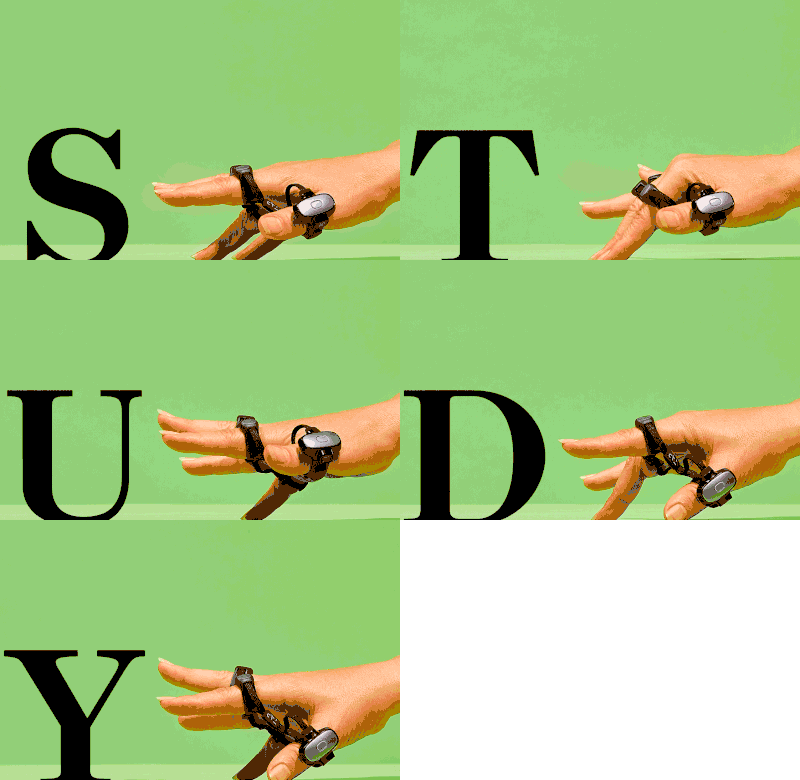 Virtual reality (VR) can do some amazing things, whether that’s immersive video game entertainment, traveling the world, connecting with friends or holding a meeting in virtual spaces and much more. Yet there’s one inherent cravat with the technology, and that’s using a keyboard. Developers tend to either avoid requiring keyboard inputs in their software but there are times when all those buttons are needed, for example going online in VR, and having a headset on your face while typing can prove awkward. Enter Tap Systems with its new Tap Wearable Keyboard and Mouse device. As you can see from the images Tap is designed to fit comfortably around a users fingers and thumb, connecting to any Bluetooth enabled device. Tap allows users to compose text, play video games, point, click and scroll using just about any available surface. When it comes to VR, the device removes the need to see what your hands are doing as tapping does not require the user to aim for keys, so they can edit documents, create spreadsheets, compose emails and texts all within a virtual environment. So how does it work? Well, Tap doesn’t use the traditional QWERTY keyboard, instead, users create letters by tapping one or more fingers onto a surface. So, for example, tapping your thumb would create the letter A, and so on. Of course with only five sensors there’s going to be quite a few combinations, which is why the company has created a teaching tool to help users become acquainted with the system. Compatible with Microsoft’s virtual desktop environment for Windows Mixed Reality, Tap can also be used with virtual desktop applications running on the Oculus Rift and HTC Vive. Additional features include a battery that can provide 8 hours of use and 7 days standby, full customization for video games and apps, adjustable ring sizes plus a recharging case. More details can be found on OUR FORUM.  On Friday, Apple will release the iPhone XS and XS Max with the XR coming in October. All these phones will partake in the annual ritual of being praised for their Appleness and criticised for the price, as per usual. These devices will also all ship with Face ID, a first for Apple which previously only offered FaceID on one device — the iPhone X. Other smartphone makers are quickly offering facial recognition systems on their own devices, from the mid-range to the most premium. As time goes on, it becomes more and more likely that your next smartphone will ship with facial recognition. If you’re more likely to use Windows 10 laptops, you’ll probably have some form of facial recognition on it too as Windows Hello catches on. Use Facebook? Your Facebook account already has facial recognition. The firm is using it to match users to their untagged photos. For the regular consumer, it’s magical in a sense, but also a little unsettling. Tech writers often explore the magical aspects of facial recognition software being installed on all our devices, but rarely the potential downsides. In other words, facial recognition is everywhere, but we haven’t really talked about it – not really. As techies, we’ve explored the fun parts of facial recognition, your phone unlocks super fast, your laptop does the same too. Microsoft’s Brad Smith has called for regulation of facial recognition software by the US Congress earlier this year, opting to open the debate in a move uncharacteristic of tech companies who are often resistant to the prospect of restrictive legislation and loathe to introduce the topic themselves. More in-depth details can be found on OUR FORUM. |
Latest Articles
|